If you’re already using MCP servers, migrating to Airstore is straightforward. This guide shows how to add your existing MCPs.

Cloud users

Add MCP servers directly in the Airstore dashboard—no config files needed.

1. Go to the Tools page

In the dashboard, navigate to Tools in the sidebar. Tools page with Add MCP Server button
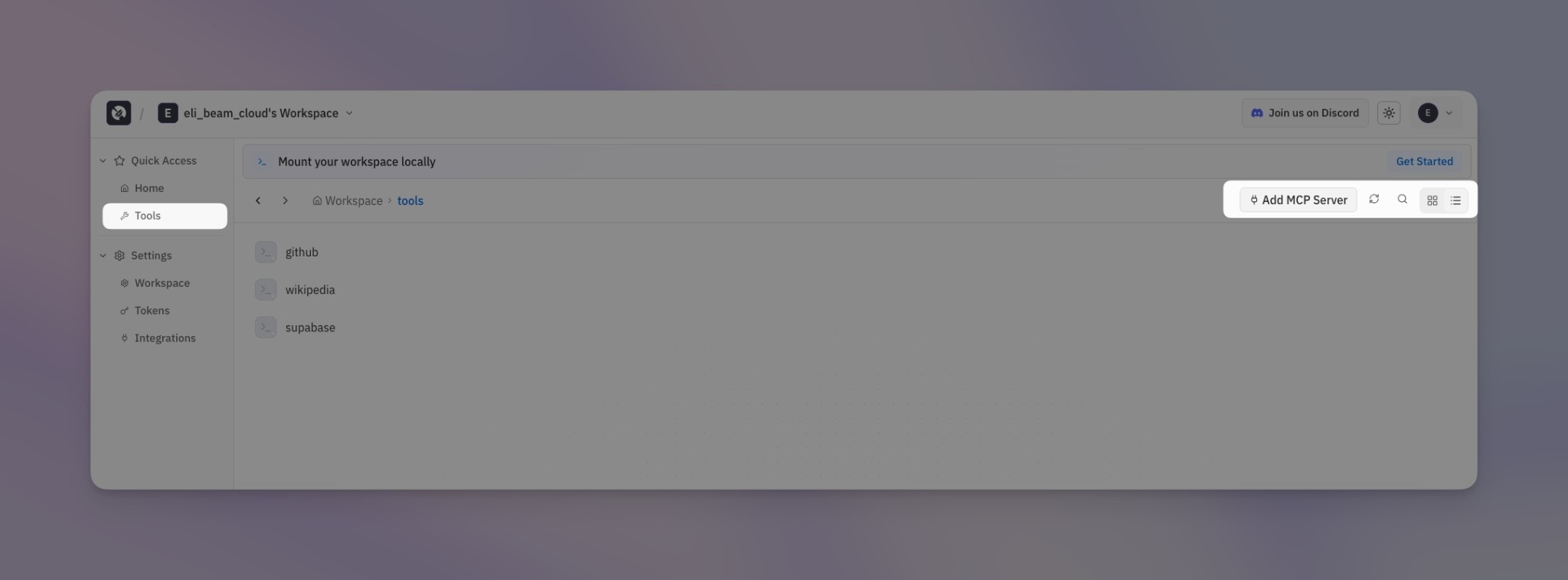
2. Click “Add MCP Server”

Click the Add MCP Server button in the top right corner.

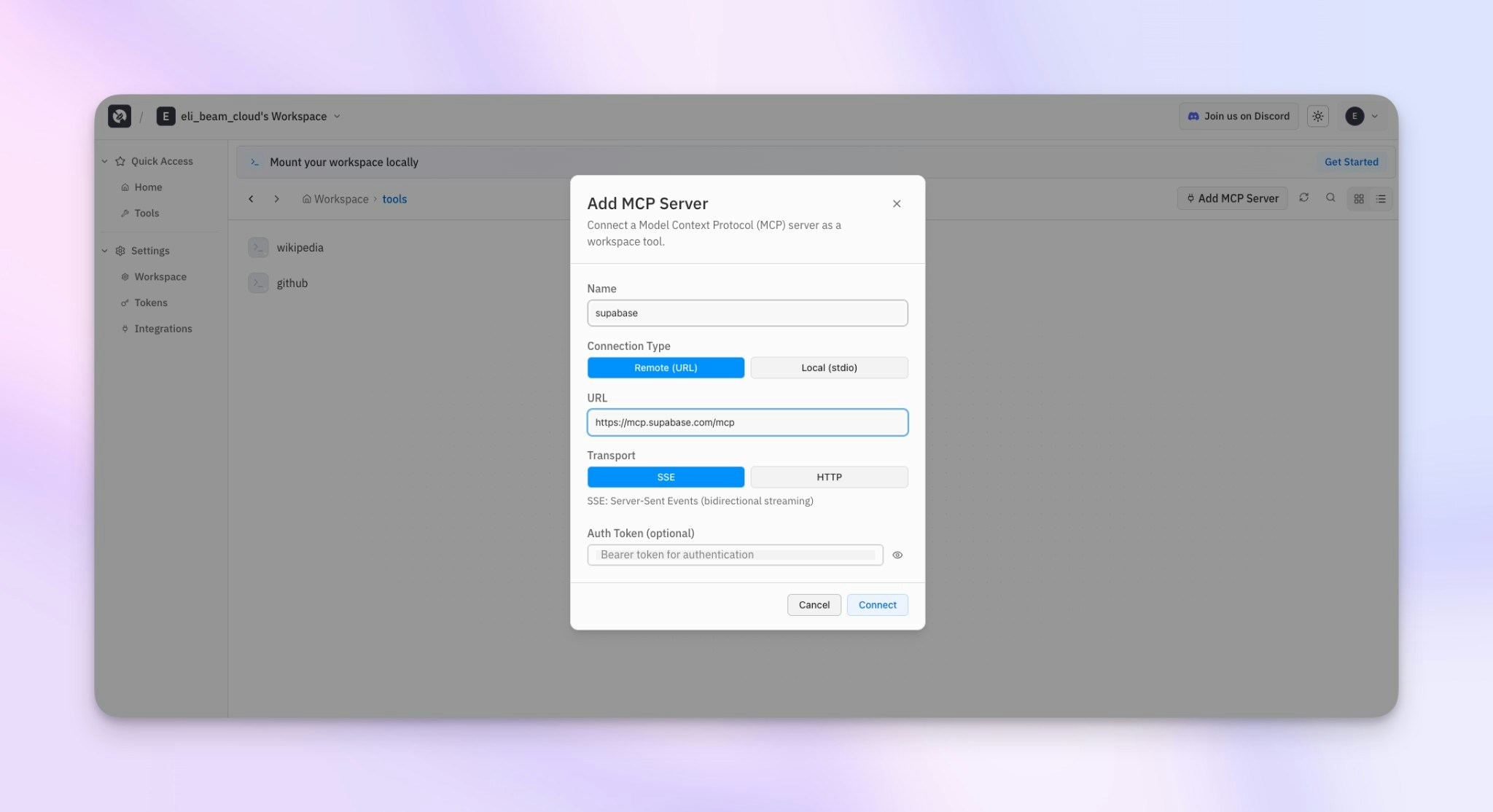
3. Configure the server

Fill in the connection details: Add MCP Server modal
FieldDescription
NameIdentifier for the tool (e.g., “supabase”, “github”)
Connection TypeRemote (URL) for hosted MCP servers, Local (stdio) for self-hosted
URLThe MCP server endpoint (e.g., https://mcp.supabase.com/mcp)
TransportSSE for streaming, HTTP for standard requests
Auth TokenOptional bearer token for authentication

4. Mount and use

After adding, mount your workspace and the tool will be available:
airstore mount ~/airstore

ls ~/airstore/tools/
# github  supabase  wikipedia

~/airstore/tools/supabase --help

Local / self-hosted users

This section is for users running Airstore in local mode. Cloud users should use the dashboard above.
For local deployments, MCP servers are configured in a config.local.yaml file:
mode: local

gateway:
  grpc:
    port: 1993
  http:
    host: 127.0.0.1
    port: 1994

tools:
  mcp:
    # Each key becomes a tool name
    my-tool:
      command: npx
      args: ["-y", "@company/mcp-tool"]
      env:
        API_KEY: "${API_KEY}"
After mounting, the tool appears at ~/airstore/tools/my-tool.

Migration steps

1. Identify your MCP servers

List the MCP servers you’re currently using. For each one, note:
  • The command used to start it (e.g., npx -y @modelcontextprotocol/server-filesystem)
  • Any arguments it requires
  • Environment variables it needs

2. Create config.local.yaml

Create a new config file and add each server under tools.mcp:
mode: local

gateway:
  grpc:
    port: 1993
  http:
    host: 127.0.0.1
    port: 1994

tools:
  mcp:
    filesystem:
      command: npx
      args: ["-y", "@modelcontextprotocol/server-filesystem", "/tmp", "/Users"]

    memory:
      command: npx
      args: ["-y", "@modelcontextprotocol/server-memory"]

    wikipedia:
      command: npx
      args: ["-y", "@modelcontextprotocol/server-wikipedia"]

3. Mount and test

airstore mount ~/airstore --config config.local.yaml
Verify your tools are available:
ls ~/airstore/tools/
# filesystem  memory  wikipedia

# Test a tool
~/airstore/tools/wikipedia search "artificial intelligence"

Common MCP server examples

Filesystem

tools:
  mcp:
    filesystem:
      command: npx
      args: ["-y", "@modelcontextprotocol/server-filesystem", "/tmp", "/Users"]

Memory

tools:
  mcp:
    memory:
      command: npx
      args: ["-y", "@modelcontextprotocol/server-memory"]

GitHub

tools:
  mcp:
    github:
      command: npx
      args: ["-y", "@modelcontextprotocol/server-github"]
      env:
        GITHUB_TOKEN: "${GITHUB_TOKEN}"
Set your token before mounting:
export GITHUB_TOKEN=ghp_xxxxxxxxxxxx
airstore mount ~/airstore --config config.local.yaml

Custom internal tools

tools:
  mcp:
    internal-api:
      command: /usr/local/bin/internal-mcp
      env:
        API_URL: https://internal.company.com
        API_KEY: "${INTERNAL_API_KEY}"

    # Python-based tool
    my-python-tool:
      command: python
      args: ["-m", "my_mcp_server"]

What changes

AspectManual MCPAirstore
Server managementYou start/stop serversAirstore handles it
Protocol handlingJSON-RPC, stdin/stdoutSimple CLI calls
Tool discoveryRead MCP specs--help flag
PipingComplexStandard bash pipes
Multi-toolManage multiple processesAll tools in one folder

Learn more