> ## Documentation Index
> Fetch the complete documentation index at: https://docs.airstore.ai/llms.txt
> Use this file to discover all available pages before exploring further.
# Migrating your MCPs to Airstore
> Move your existing MCP server configurations to Airstore
If you're already using MCP servers, migrating to Airstore is straightforward. This guide shows how to add your existing MCPs.
## Cloud users
Add MCP servers directly in the Airstore dashboard—no config files needed.
### 1. Go to the Tools page
In the [dashboard](https://app.airstore.ai), navigate to **Tools** in the sidebar.
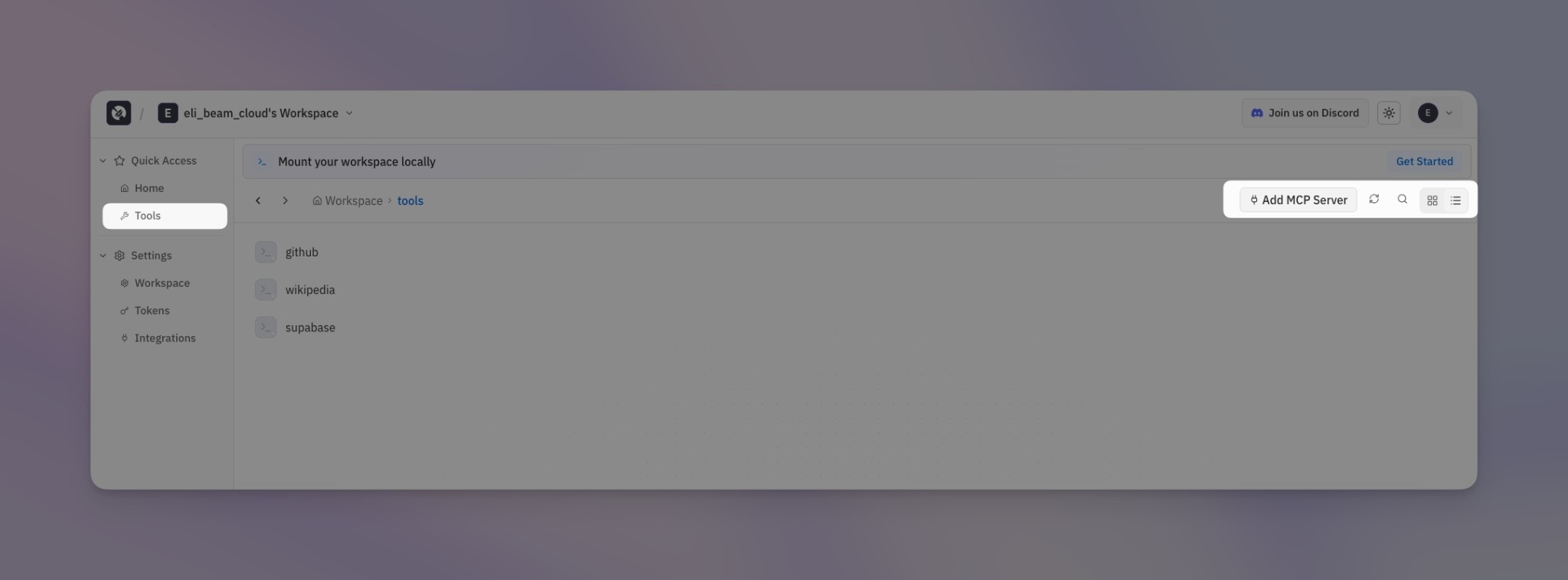 ### 2. Click "Add MCP Server"
Click the **Add MCP Server** button in the top right corner.
### 3. Configure the server
Fill in the connection details:
### 2. Click "Add MCP Server"
Click the **Add MCP Server** button in the top right corner.
### 3. Configure the server
Fill in the connection details:
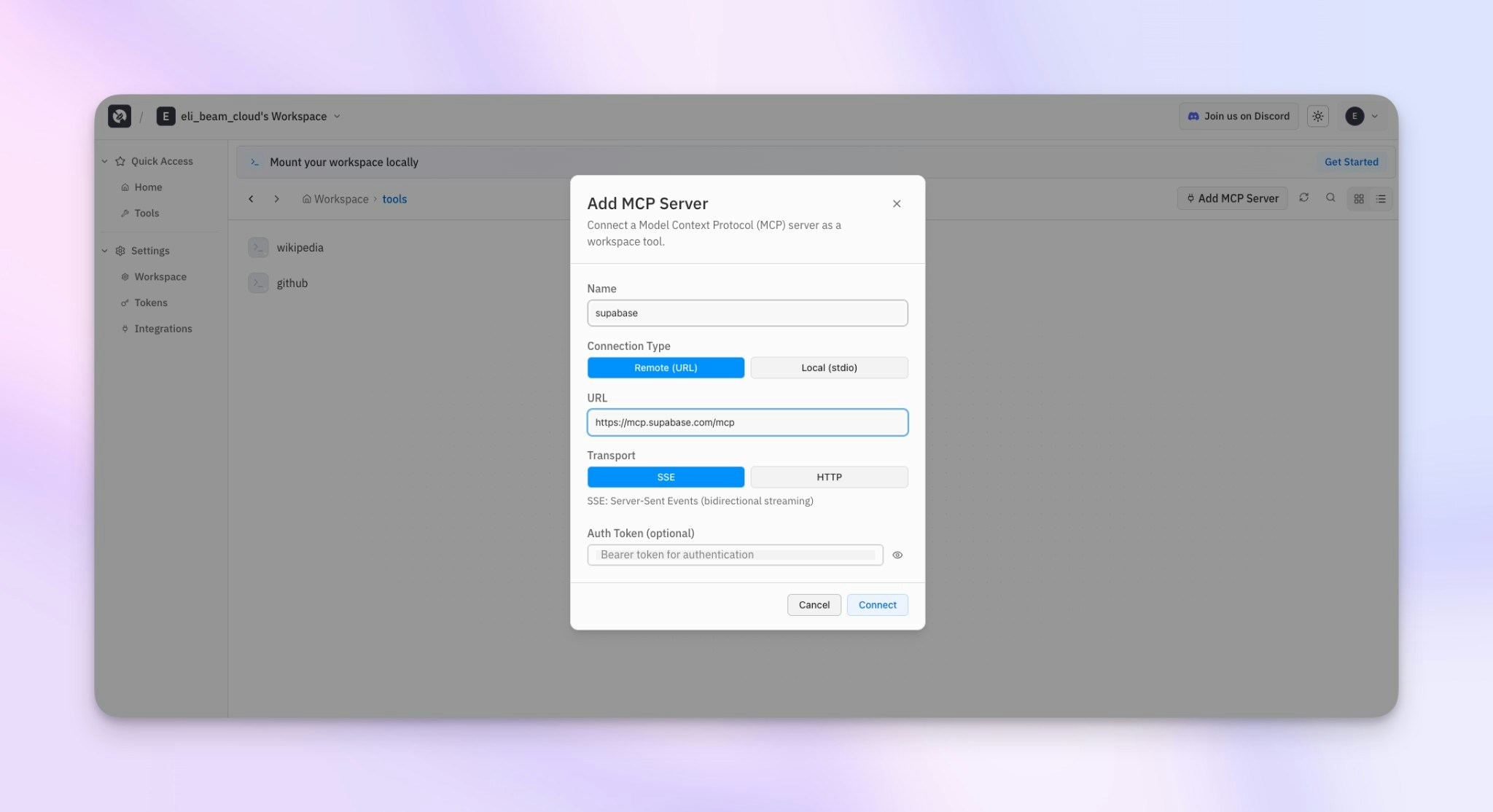 | Field | Description |
| ------------------- | -------------------------------------------------------------------------- |
| **Name** | Identifier for the tool (e.g., "supabase", "github") |
| **Connection Type** | **Remote (URL)** for hosted MCP servers, **Local (stdio)** for self-hosted |
| **URL** | The MCP server endpoint (e.g., `https://mcp.supabase.com/mcp`) |
| **Transport** | **SSE** for streaming, **HTTP** for standard requests |
| **Auth Token** | Optional bearer token for authentication |
### 4. Mount and use
After adding, mount your workspace and the tool will be available:
```bash theme={null}
airstore mount ~/airstore
ls ~/airstore/tools/
# github supabase wikipedia
~/airstore/tools/supabase --help
```
***
## Local / self-hosted users
This section is for users running Airstore in [local mode](/deployment/local). Cloud users should use the dashboard above.
For local deployments, MCP servers are configured in a `config.local.yaml` file:
```yaml theme={null}
mode: local
gateway:
grpc:
port: 1993
http:
host: 127.0.0.1
port: 1994
tools:
mcp:
# Each key becomes a tool name
my-tool:
command: npx
args: ["-y", "@company/mcp-tool"]
env:
API_KEY: "${API_KEY}"
```
After mounting, the tool appears at `~/airstore/tools/my-tool`.
### Migration steps
#### 1. Identify your MCP servers
List the MCP servers you're currently using. For each one, note:
* The command used to start it (e.g., `npx -y @modelcontextprotocol/server-filesystem`)
* Any arguments it requires
* Environment variables it needs
#### 2. Create config.local.yaml
Create a new config file and add each server under `tools.mcp`:
```yaml theme={null}
mode: local
gateway:
grpc:
port: 1993
http:
host: 127.0.0.1
port: 1994
tools:
mcp:
filesystem:
command: npx
args: ["-y", "@modelcontextprotocol/server-filesystem", "/tmp", "/Users"]
memory:
command: npx
args: ["-y", "@modelcontextprotocol/server-memory"]
wikipedia:
command: npx
args: ["-y", "@modelcontextprotocol/server-wikipedia"]
```
#### 3. Mount and test
```bash theme={null}
airstore mount ~/airstore --config config.local.yaml
```
Verify your tools are available:
```bash theme={null}
ls ~/airstore/tools/
# filesystem memory wikipedia
# Test a tool
~/airstore/tools/wikipedia search "artificial intelligence"
```
## Common MCP server examples
### Filesystem
```yaml theme={null}
tools:
mcp:
filesystem:
command: npx
args: ["-y", "@modelcontextprotocol/server-filesystem", "/tmp", "/Users"]
```
### Memory
```yaml theme={null}
tools:
mcp:
memory:
command: npx
args: ["-y", "@modelcontextprotocol/server-memory"]
```
### GitHub
```yaml theme={null}
tools:
mcp:
github:
command: npx
args: ["-y", "@modelcontextprotocol/server-github"]
env:
GITHUB_TOKEN: "${GITHUB_TOKEN}"
```
Set your token before mounting:
```bash theme={null}
export GITHUB_TOKEN=ghp_xxxxxxxxxxxx
airstore mount ~/airstore --config config.local.yaml
```
### Custom internal tools
```yaml theme={null}
tools:
mcp:
internal-api:
command: /usr/local/bin/internal-mcp
env:
API_URL: https://internal.company.com
API_KEY: "${INTERNAL_API_KEY}"
# Python-based tool
my-python-tool:
command: python
args: ["-m", "my_mcp_server"]
```
## What changes
| Aspect | Manual MCP | Airstore |
| ----------------- | ------------------------- | ----------------------- |
| Server management | You start/stop servers | Airstore handles it |
| Protocol handling | JSON-RPC, stdin/stdout | Simple CLI calls |
| Tool discovery | Read MCP specs | `--help` flag |
| Piping | Complex | Standard bash pipes |
| Multi-tool | Manage multiple processes | All tools in one folder |
## Learn more
* [Tools](/concepts/tools) - Learn more about how tools work
* [Local deployment](/deployment/local) - Full local deployment guide
| Field | Description |
| ------------------- | -------------------------------------------------------------------------- |
| **Name** | Identifier for the tool (e.g., "supabase", "github") |
| **Connection Type** | **Remote (URL)** for hosted MCP servers, **Local (stdio)** for self-hosted |
| **URL** | The MCP server endpoint (e.g., `https://mcp.supabase.com/mcp`) |
| **Transport** | **SSE** for streaming, **HTTP** for standard requests |
| **Auth Token** | Optional bearer token for authentication |
### 4. Mount and use
After adding, mount your workspace and the tool will be available:
```bash theme={null}
airstore mount ~/airstore
ls ~/airstore/tools/
# github supabase wikipedia
~/airstore/tools/supabase --help
```
***
## Local / self-hosted users
This section is for users running Airstore in [local mode](/deployment/local). Cloud users should use the dashboard above.
For local deployments, MCP servers are configured in a `config.local.yaml` file:
```yaml theme={null}
mode: local
gateway:
grpc:
port: 1993
http:
host: 127.0.0.1
port: 1994
tools:
mcp:
# Each key becomes a tool name
my-tool:
command: npx
args: ["-y", "@company/mcp-tool"]
env:
API_KEY: "${API_KEY}"
```
After mounting, the tool appears at `~/airstore/tools/my-tool`.
### Migration steps
#### 1. Identify your MCP servers
List the MCP servers you're currently using. For each one, note:
* The command used to start it (e.g., `npx -y @modelcontextprotocol/server-filesystem`)
* Any arguments it requires
* Environment variables it needs
#### 2. Create config.local.yaml
Create a new config file and add each server under `tools.mcp`:
```yaml theme={null}
mode: local
gateway:
grpc:
port: 1993
http:
host: 127.0.0.1
port: 1994
tools:
mcp:
filesystem:
command: npx
args: ["-y", "@modelcontextprotocol/server-filesystem", "/tmp", "/Users"]
memory:
command: npx
args: ["-y", "@modelcontextprotocol/server-memory"]
wikipedia:
command: npx
args: ["-y", "@modelcontextprotocol/server-wikipedia"]
```
#### 3. Mount and test
```bash theme={null}
airstore mount ~/airstore --config config.local.yaml
```
Verify your tools are available:
```bash theme={null}
ls ~/airstore/tools/
# filesystem memory wikipedia
# Test a tool
~/airstore/tools/wikipedia search "artificial intelligence"
```
## Common MCP server examples
### Filesystem
```yaml theme={null}
tools:
mcp:
filesystem:
command: npx
args: ["-y", "@modelcontextprotocol/server-filesystem", "/tmp", "/Users"]
```
### Memory
```yaml theme={null}
tools:
mcp:
memory:
command: npx
args: ["-y", "@modelcontextprotocol/server-memory"]
```
### GitHub
```yaml theme={null}
tools:
mcp:
github:
command: npx
args: ["-y", "@modelcontextprotocol/server-github"]
env:
GITHUB_TOKEN: "${GITHUB_TOKEN}"
```
Set your token before mounting:
```bash theme={null}
export GITHUB_TOKEN=ghp_xxxxxxxxxxxx
airstore mount ~/airstore --config config.local.yaml
```
### Custom internal tools
```yaml theme={null}
tools:
mcp:
internal-api:
command: /usr/local/bin/internal-mcp
env:
API_URL: https://internal.company.com
API_KEY: "${INTERNAL_API_KEY}"
# Python-based tool
my-python-tool:
command: python
args: ["-m", "my_mcp_server"]
```
## What changes
| Aspect | Manual MCP | Airstore |
| ----------------- | ------------------------- | ----------------------- |
| Server management | You start/stop servers | Airstore handles it |
| Protocol handling | JSON-RPC, stdin/stdout | Simple CLI calls |
| Tool discovery | Read MCP specs | `--help` flag |
| Piping | Complex | Standard bash pipes |
| Multi-tool | Manage multiple processes | All tools in one folder |
## Learn more
* [Tools](/concepts/tools) - Learn more about how tools work
* [Local deployment](/deployment/local) - Full local deployment guide